Minnesota Timberwolves
- 3.3
- Rating
- 100.00K
- Installs
- Free
- Price

 Analysis by App-foxy
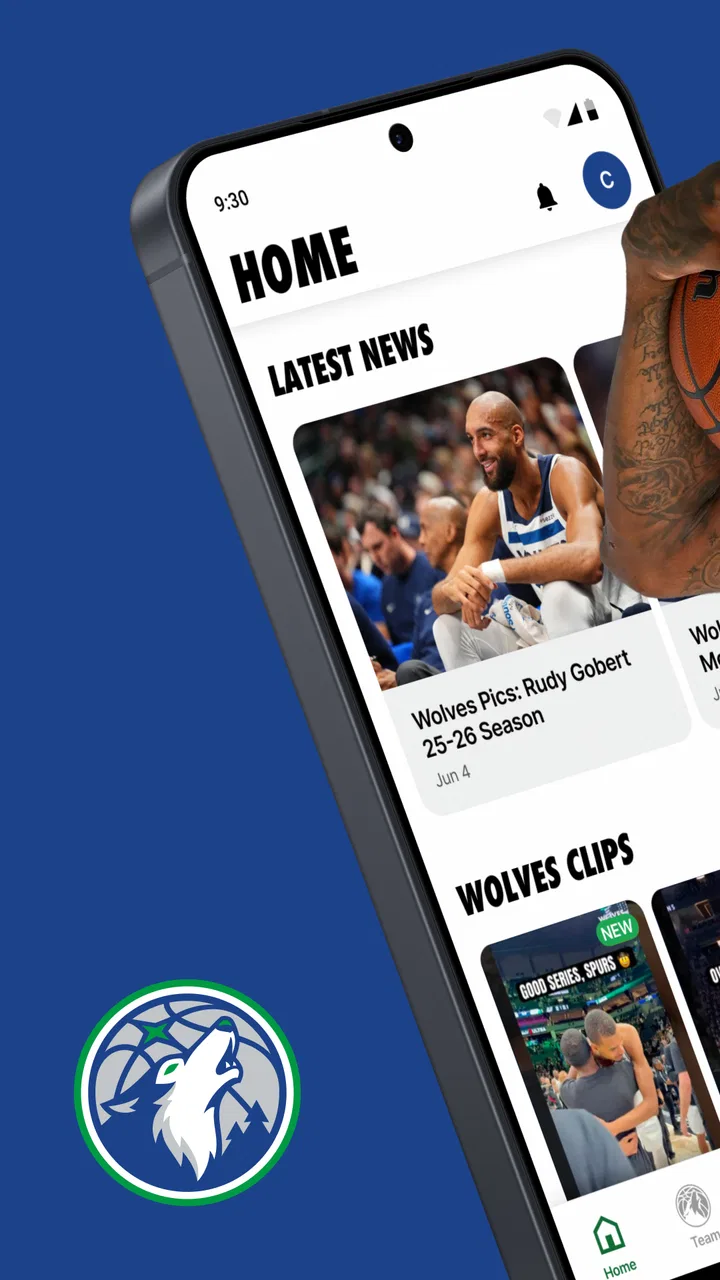
I installed Minnesota Timberwolves to see how useful it is beyond the team name and the promise of keeping up with the club. It is a free sports app from Minnesota Timberwolves, aimed at fans who want team information, ticket access, and mobile entry in one place. My overall impression is practical rather than flashy: it makes the most sense when I am already following the team or preparing to attend a game.
The app has been available since December 9, 2014, and its current version is 26.2.20 for devices running at least operating system 10. That long presence gives it a familiar role in the Timberwolves fan routine, but it also sets the right expectation. I would not treat it as a complete basketball news service or a replacement for every general sports app. Its value is more focused: it connects the fan experience with the team’s own information and ticketing channels.
What the Timberwolves app is really for
I see this app as most useful when I treat it as a practical part of following the Timberwolves, rather than another feed to check out of habit. I’d first decide which job matters to me—keeping up with team news or getting ready for a game—then build a simple routine around that. That distinction makes it easier to choose what to open and what to leave for later.
You May Also Like

 Pandora - Music & Podcasts
Pandora’s Music Is Easy to Start, but Harder to Recover
Pandora’s strength is its low-effort path from a seed to a station. Its weak spot is how much confidence it asks you to place in connection, setup, and quiet recovery.

 AccuWeather: Weather Radar
AccuWeather Review: A Quick, Clear Forecast for Everyday Decisions
For everyday plans, the best forecast is the one you can understand quickly. AccuWeather makes rain timing, radar, and local conditions easy to act on, with a few trade-offs.

 Hill Climb Racing
Why Hill Climb Racing Still Turns Crashes Into One More Run
A tiny car, a bumpy hill and one more upgrade: Hill Climb Racing keeps resurfacing because its simple chaos makes every near-miss feel personal.

 AliExpress - Shopping App
AliExpress Makes Global Shopping Feel Personal, but Shoppers Bear the Risk
AliExpress turns a global marketplace into a pocket-sized discovery engine. Its reach is useful, its shopping loop compelling, and its trade-offs easy to miss.

 Lords Mobile: Kingdom Wars
Lords Mobile Is a Kingdom-Building Routine, Not a Quick Match
A case-by-case verdict on the building, battles, device demands, and social commitments that make Lords Mobile rewarding for some players and exhausting for others.

 PDF Scanner app - TapScanner
TapScanner Makes Paperwork Easier to Capture, Check, and Share
TapScanner makes scanning with a phone feel less like a rescue operation and more like a dependable step in getting work done. Its capture tools are useful, though not flawless.
More From Our News Desk
View All News


A team-specific home for useful game-day tasks
When I opened the app, I approached it less like a general news reader and more like a digital companion for following one NBA team. That distinction matters. A broad sports app may be better for comparing scores across leagues, checking several teams at once, or reading a wide range of independent coverage. This app is more relevant when the Minnesota Timberwolves are the team I care about and I want their updates close at hand.
The store summary points to three central jobs: tickets, news, and mobile entry. Those are not equally important to every user. A casual fan may mainly want news, while a season-ticket holder or someone attending a game may care much more about having ticket-related access available on the phone. In my view, the strongest reason to install it is the combination of information and attendance tools rather than any single news item.
I also like that the app’s content rating is Everyone. That makes it suitable for a family device or for younger fans who simply want to follow the team, although parents should still make their own decisions about account access and purchases. The rating describes audience suitability; it does not remove the need to pay attention when tickets, sign-in details, or personal information are involved.
Where it fits beside familiar alternatives
For scores, standings, league-wide alerts, and coverage of several teams, I would still choose a general sports application. Those services are designed for breadth. The Timberwolves app has a narrower identity, which can be an advantage when I do not want to sort through unrelated teams and leagues.
For tickets, the comparison is more complicated. A venue or ticketing service may be useful when I am shopping across events, comparing available seats, or managing tickets from different organizations. The team app is more convenient when my plans already involve a Timberwolves game and I want the club’s own route to tickets and mobile entry. The trade-off is that it is not intended to be a universal ticket wallet for every event in my life.
Social media can be faster for reactions and conversation, but it is also noisier and less structured. I find the official app better suited to checking team-focused information without relying on a stream that changes constantly. On the other hand, anyone who wants independent analysis, fan debate, or instant commentary may find social platforms more lively.
What I would do before going to a game
My practical advice is to install and open the app before leaving home, not for the first time while standing outside the arena. I would sign in, review the ticket area, and make sure the phone is charged. Mobile entry is convenient only when the device, account, and ticket are ready when they are needed.
I would also avoid treating the app as the only place where important information exists. If I were attending with family or friends, I would make sure everyone knows who is managing the tickets and how the group will meet if phones become difficult to use. This is not a criticism unique to this app; it is a sensible habit for any digital ticket system.
A useful but easy-to-miss workflow is separating “following the team” from “preparing for attendance.” I can use the news side during the week, then switch to the ticket and entry side on game day. Keeping those purposes distinct helps me avoid opening the app at the last minute and discovering that I still need to complete an account step or locate the correct ticket.
Trust starts with knowing what the app is not
The developer is clearly identified as Minnesota Timberwolves, which gives the app a direct team connection rather than making it look like an unrelated fan utility. That is useful context when I am deciding where to read team information or manage a team event. Still, an official identity should not lead me to skip ordinary caution around accounts, purchases, or personal data.
I judge trust here through visible choices rather than assumptions. I look for clear prompts, understandable sign-in steps, and the ability to decide whether I want to proceed before entering sensitive information. I also prefer to review any permission request in context. A request that makes sense for mobile entry may deserve a different level of attention from a request that appears unrelated to tickets or team content.
The app’s average rating is 3.3 from around 1.1 thousand ratings, with roughly 315 written reviews. I read that as a mixed public experience rather than an automatic warning or endorsement. A rating in that range tells me the app may be useful for its intended purpose while still leaving room for friction, especially around account access, ticket handling, or individual device behavior.
Permissions and data-sensitive moments
There are several moments when I would slow down and read the screen carefully. The first is account creation or sign-in. I would check which details are requested, whether the app explains why they are needed, and whether I am signing into the team experience or being redirected to another service. I would not reuse an important password simply because the app is free.
The second sensitive moment is ticket access. Tickets are more than ordinary content: they can represent money, event access, and plans shared with other people. I would verify the event, date, seat information, and account before transferring or displaying anything. If another person is attending, I would decide in advance whether to keep the ticket under my account or share it through the available process rather than improvising at the entrance.
The third is mobile entry itself. A phone screen may be scanned in a busy environment, so I would avoid handing my unlocked device to someone unnecessarily. I would display only what is required, keep the app updated, and use a secure device lock. These are simple user-controlled safeguards, but they matter more than the convenience of opening a ticket quickly.
I am careful not to treat the app’s free price as meaning that every related action is free. Downloading the app costs nothing, while tickets and other event-related transactions can involve separate costs. I would always review the final details before confirming a purchase or accepting a transfer.
Account control matters more than the download
For me, the most important control is knowing which account holds the information that affects entry. If I install the app on a new phone, I would use the same sign-in method I normally use and confirm that the expected tickets and preferences appear before deleting the old app. I would not assume that reinstalling automatically solves an account problem.
If I share a phone with a family member, I would keep the ticket account separate from casual browsing whenever possible. That reduces the chance of someone changing a setting or opening a transaction by mistake. I would also sign out on a borrowed or shared device, particularly after handling tickets.
Notifications deserve a deliberate setup. Team news alerts can be helpful, but too many messages can make the app feel intrusive and cause important ticket information to blend into ordinary updates. I would enable the alerts I genuinely use, then revisit them after a few days. Turning off an unnecessary notification is a small but meaningful way to keep control of the experience.
The same principle applies to location or device access. I would allow only what is clearly connected to a task I want to perform, and I would revisit the phone’s permission settings if I stop using that task. The safest approach is not to grant everything automatically, but to make a choice each time the purpose is understandable.
Everyday use: a realistic fan scenario
Imagine I am meeting two friends for a Timberwolves game after work. During the day, I use the app to check team news, but I do not need to keep it open constantly. Before leaving, I sign in, locate the tickets, confirm that each person knows who has them, and charge my phone. On the journey, I avoid relying on a weak signal for the first time; I prepare the relevant screen as soon as it is practical.
At the venue, the app’s mobile-entry role becomes more valuable than its news feed. I am not searching through unrelated sports stories or trying to remember which service contains the ticket. The team-specific route is easier because the event and the app belong to the same fan context. If a friend needs access, I handle that before reaching the gate rather than passing my unlocked phone around.
After the game, the app remains useful for staying connected to the team, but I would not keep every notification enabled just because the visit went smoothly. I would return to my normal settings and decide whether the news updates are worth the attention. This small reset keeps a game-day tool from becoming unnecessary background noise.
Small friction points I would plan around
The main limitation is focus. Because the app is built around the Timberwolves, it may feel unnecessary to someone who follows many teams or wants a single dashboard for all sports. Installing it only for occasional score checks could add another app without replacing the broader service already on the phone.
Ticket-related tasks can also create pressure. When an app is connected to entry, a login issue or an unclear account state feels more serious than a delayed news article. I would therefore test access early, keep the phone charged, and avoid waiting until the gate to solve account questions. This is the kind of preparation that makes the app feel reliable in practice.
Another trade-off is that official team information is convenient but naturally limited to the team’s perspective and priorities. I would use it for direct Timberwolves updates, then turn to independent reporting or broader sports coverage when I want deeper context, comparisons, or discussion beyond the club’s own channel.
Users who dislike creating accounts, receiving notifications, or managing tickets digitally may not enjoy the app’s central workflow. They may be better served by a browser, a venue’s assistance desk, or a general news source, depending on the task. The app is not a universal solution for every fan preference.
Performance expectations and responsible use
With over 100 thousand installs, the app has reached a meaningful audience, and its current release shows that it continues to be maintained. I still would not confuse popularity with perfect performance on every phone. The minimum operating system is 10, so anyone using an older device should check compatibility before planning around it.
I recommend keeping enough free storage and installing updates before a major game day rather than immediately before entering. Updates can improve compatibility, but changing an app at the last moment is not ideal when tickets are involved. I would also keep a backup plan for contacting the venue or the person who arranged the tickets.
From a privacy perspective, my habit is straightforward: read the permission prompt, use a strong account password, enable device security, and review notifications. I would not enter payment information on a screen I do not understand, and I would check the recipient carefully before sharing a ticket. These choices give me more control without preventing normal use.
Who should install it
I would recommend it to a committed Timberwolves fan, someone attending a game, or a household that wants one team-focused place for news and mobile entry. It is especially sensible when the app will be used repeatedly rather than downloaded once for a single score.
I would be more hesitant to recommend it to a person who mainly follows the entire league, wants extensive independent analysis, or already has a trusted all-sports app and a separate ticketing routine. That user may gain little from adding a team-specific app unless the ticket and entry functions are important.
It is also not the right choice for someone who expects a completely anonymous experience. Any app connected to tickets or account-based access deserves careful handling of sign-in details and personal information. The free download does not eliminate those responsibilities.
My cautious verdict
After using it as both a news companion and a game-day tool, I see Minnesota Timberwolves as a focused official app rather than an all-purpose sports platform. Its clearest strength is bringing team updates and attendance-related tasks into the same Timberwolves environment. That can remove unnecessary searching when I already know which team and event matter.
Its weaker side is the same narrow focus. Fans who want broad sports coverage, independent commentary, or one place for many teams may prefer a general alternative. I also think ticket users should prepare early and pay attention to account, permission, and sharing choices instead of assuming that mobile entry will always be effortless.
My final recommendation is cautious but positive: install it if you regularly follow the Timberwolves or have a game coming up, then configure notifications and account access deliberately. The app is free, rated for Everyone, and built for a specific fan relationship. Use it as a prepared game-day tool, not as a substitute for every sports and ticket service on your phone.
For my own routine, that distinction makes the decision simple. I would keep it when Timberwolves tickets or team news are part of my week, and I would skip it if I only need occasional league-wide scores. In the right situation, Minnesota Timberwolves is convenient and appropriately focused; it just rewards users who take a few minutes to understand their account and privacy choices before the important moment arrives.
FAQs for Minnesota Timberwolves
01What features does the Minnesota Timberwolves app offer?
The Minnesota Timberwolves app provides real-time game updates, player statistics, and exclusive team content. Users can access video highlights, purchase game tickets, and receive notifications about upcoming games. The app also includes interactive features such as fan polls and live chats during games.
02Is the app available for both Android and iOS devices?
Yes, the Minnesota Timberwolves app is available for download on both Android and iOS platforms. Users can find the app on the Google Play Store for Android devices and the Apple App Store for iOS devices, ensuring a seamless experience regardless of the operating system.
03Are there any in-app purchases or subscription fees?
The Minnesota Timberwolves app itself is free to download. However, there may be optional in-app purchases, such as exclusive content or merchandise. Additionally, users can purchase game tickets directly through the app. These features enhance the fan experience but are not required for basic app functionality.
04How can I stay updated with the latest team news and events?
The app offers push notifications to keep users informed about the latest team news, game schedules, and special events. By enabling these notifications, fans can receive timely updates directly on their devices, ensuring they never miss important announcements or game highlights.
05Can I watch live games through the app?
While the Minnesota Timberwolves app provides video highlights and post-game recaps, live game streaming may not be available directly through the app. Users may need to access official broadcasters or streaming services authorized to air the games for live content. Check the app for potential updates on streaming options.
Pros
- User-friendly interface
- easy navigation.
- Real-time game stats and updates.
- Exclusive video content and highlights.
- Customizable notifications for games.
- Access to team news and player profiles.
Cons
- Requires stable internet connection.
- Limited features for non-members.
- Occasional app performance lags.
- No offline content availability.
- Frequent updates can be intrusive.

Minnesota Timberwolves
Gallery